Choosing the Hosting WordPress suitable is one of the most crucial decisions for the success of your online project. It is the base that supports your site, directly influencing loading speed, the security y la experiencia del usuario. En esta guía definitiva, te acompañaremos paso a paso para que navegues por la “jungla” de opciones y encuentres el hosting perfecto para tu WordPress, without dying in the attempt. Get ready to build the foundations of a robust and efficient website.
Before starting
To make the best decision about your hosting, it's useful to have some key points clear. This will help you filter options and focus on what you really need.
- Define your website's objectives: Will it be a blog personal, an online store, a professional portfolio? What volume of traffic do you expect?
- Set a budget: How much are you willing to invest monthly or annually in your hosting?
- Evaluate your technical knowledge: Do you need hosting that takes care of everything (managed) or do you prefer to have total control?
- Think about the future: Do you expect your website to grow significantly in the coming years? Scalability is key.
Basic knowledge of navigating the
Dedicating time to this guide will guarantee you an informed choice. Estimate between 45 and 60 minutes to read and reflect on each step. The difficulty level is intermediate-low, as we will simplify complex concepts so that anyone can understand and apply them.
Step 1: Understanding What Hosting Is WordPress and why it is crucial
Hosting is, in essence, the place where all the files and database of your website are stored so that it is accessible on the internet 24/7. For WordPress, we are not talking about just any hosting, but an optimized service that understands the peculiarities of this CMS. A good Hosting WordPress , not only hosts your data; it is a strategic partner that ensures your website loads fast, is secure, and always available to your visitors. It directly impacts SEO, bounce rate, and ultimately, your conversions. It is the invisible infrastructure that makes everything work perfectly.
- Technical definition: A web server that stores your files WordPress (themes, plugins, images, etc.) and its database, making them accessible via the internet.
- Simple analogy: Think of your website as a house and hosting as the land it's built on. Without good land, the house won't stand.
- Impact on SEO: Loading speed is a key factor for search engine ranking like Google. Slow hosting will penalize you.
- Importance of stability: Reliable hosting ensures your website is always online, preventing traffic and sales losses.
Tip: Think of your Hosting WordPress like the foundations of your house. If they are weak, everything else crumbles. Invest in a solid foundation from the beginning!
How to verify it worked: Make sure you understand that hosting is not just space, but a comprehensive service that influences every aspect of your online presence.
Step 2: Exploring Hosting Types WordPress: Which one suits your project?
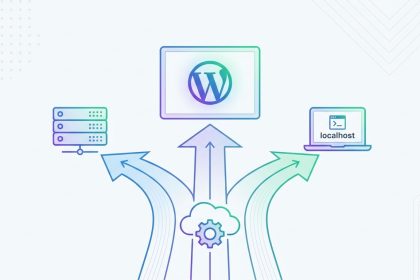
Not all hostings are equal, and what works for a blog small can not be enough for an online store with a lot of traffic. Knowing the types of Hosting WordPress available will help you choose the most suitable option for your current and future needs. Each type offers different levels of resources, control, and price, adapting to various project scales. From the most economical options to the solutions high-performance, understanding their differences is fundamental to avoid overpaying for something you don't need or falling short with an insufficient option.
- Shared Hosting: Ideal for personal blogs or small businesses. You share a server with many other sites, which makes it economical but with limited resources.
- VPS Hosting (Virtual Private Server): An intermediate step. You get dedicated resources within a shared physical server. More power and control than shared.
- Cloud Hosting: Scalable and flexible. Your site is hosted on a network of servers, which allows for load distribution and easy resource scaling according to demand.
- Dedicated Hosting: You have an entire physical server to yourself. Maximum performance and control, but also the most expensive and requires advanced technical knowledge.
- Managed Hosting: Specialized in WordPress. The provider handles most technical tasks (updates, security, backups). Ideal for those seeking convenience and premium performance.
Warning: Don't be swayed only by the lowest price without understanding the limitations. A cheap hosting today can be a headache (and an extra cost) tomorrow. Scalability is key!
How to verify it worked: Can you identify which type of Hosting WordPress aligns best with your current and future needs, considering your budget and technical knowledge?
Step 3: Key Factors for Choosing Your Hosting WordPress Ideal
Once you know the types, it's time to delve into the factors that truly make a difference in your website's daily operation. It's not just about disk space, but a set of features that directly impact your site's speed, security, and reliability. Prioritizing these elements will allow you to make an informed decision and avoid unpleasant surprises. Consider these points as your essential checklist for evaluating any provider of Hosting WordPress.
- Performance and Speed: Look for servers with SSD disks, server-level caching options, and CDN (Content Delivery Network) integration. A fast website is crucial for user experience and SEO.
- Technical Support: It is vital that they offer 24/7 support, through multiple channels (chat, phone, tickets) and with qualified staff who understand WordPress.
- Security: Make sure they include free SSL certificates, automatic and regular backups, malware protection, and firewalls.
- Scalability: Will you be able to increase the resources (CPU, RAM, storage) easily if your website grows?
- Server Location: Choose a server geographically close to your main audience to reduce latency and improve loading speed.
- Guaranteed Uptime: Look for providers that offer 99.9% uptime or more, which means your website will almost always be online.
Tip: Good technical support is pure gold. Look for providers that offer 24/7 support in your language, it will save you from many unexpected troubles and frustrations!
How to verify it worked: You have created a prioritized list of features that your WordPress Hosting should have, based on the specific needs of your project.
Step 4: Analyzing WordPress Hosting Providers: Beyond Marketing
The market is saturated with offers and promotions, so it's easy to feel overwhelmed. This step will teach you to look beyond advertising and thoroughly research providers. Reputation, real user opinions, and the fine print of contracts are as important as technical features. Don't just trust what they say on their website; look for independent information and be critical. Good research at this point can save you many headaches and money in the long run when choosing your WordPress Hosting.
- Research reputation: Look for reviews on independent websites, forums, and social media. Pay attention to recurring complaints about support or performance.
- Read user reviews: Don't just look for the stars, read the detailed comments. What problems did they encounter? How did the provider solve them?
- Understand the SLAs (Service Level Agreements): What uptime guarantees do they offer? What compensations are there if they don't comply?
- Compare renewal prices: Launch prices are often very attractive, but the renewal cost can be significantly higher. Make sure you know the long-term price.
- Refund policies: Do they offer a money-back guarantee? For how long? This gives you security to try the service.
Warning: Launch prices are often very attractive, but the renewal cost can be significantly higher. Make sure to read the fine print to avoid unpleasant surprises!
How to verify it worked: You have researched at least three WordPress Hosting providers, comparing not only their features and initial prices, but also their reputation and renewal policies.
Step 5: Preparing Your WordPress Hosting Migration (If you already have a website)
If you already have a WordPress website hosted on another server and want to switch to a new provider, migration can seem like an intimidating process. However, with proper planning and the right tools, it can be a smooth and seamless process. Many providers of WordPress Hosting offer free or assisted migration services, which is a huge advantage. This step will guide you on how to prepare and execute this crucial change, minimizing any downtime for your visitors.
- Perform a complete backup: Before any move, make a full backup of your website (files and database). This is crucial.
- Check if the new hosting offers free migration: Many providers include it as part of their service to attract new customers. Take advantage of it!
- Use plugins migration: If you prefer to do it yourself, plugins such as All-in-One WP Migration or Duplicator greatly facilitate the process. Export your site and then import it into the new hosting.
- Update the DNS: Once your site is on the new server, you will need to change your domain's DNS servers to point to the new hosting. This change can take a few hours to propagate.
- Verify everything: After the migration, browse your site, test forms, links, and images to ensure everything works correctly.
Tip: Always, always, always make a complete backup of your site before any migration! It's your digital lifeline and will give you peace of mind.
How to verify it worked: You have understood the migration process and have a clear plan to execute it smoothly, or you know that your new provider will help you with the transfer of your WordPress Hosting.
Step 6: Initial Setup and Post-Installation Optimization of WordPress Hosting
Once your WordPress is hosted on the new server, the work doesn't end. The first settings are fundamental to ensure your site functions optimally from the start. Correct configuration can drastically improve loading speed and security. This step focuses on those initial optimization actions that are often overlooked, but which have a significant impact on the performance of your WordPress Hosting and, therefore, in the experience of your users.
- Select the latest PHP version: Access your control panel (cPanel, Plesk, etc.) and make sure your WordPress is using the latest and most stable PHP version. Older versions are slower and less secure.
- Configure plugins caching: Install and configure a caching plugin like WP Super Cache or LiteSpeed Cache (if your hosting supports it). This reduces server load and speeds up content delivery.
- Integrate a CDN: If your hosting doesn't include it, consider using a CDN service like Cloudflare. It will distribute your content across global servers, reducing latency for users in different locations.
- Optimize images: Use plugins like ShortPixel or Smush to compress and optimize the images you upload to your WordPress. Heavy images are one of the main causes of slow sites.
- Check the file
wp-config.php: Make sure it is configured for the maximum PHP memory your hosting allows, which can prevent errors due to lack of resources.
Tip: A small investment of time in the initial optimization of your WordPress Hosting can save you hours of frustration and drastically improve your users' experience. Don't postpone it!
How to verify it worked: You have accessed your WordPress Hosting control panel and performed basic optimization configurations, noticing an improvement in your site's speed.
Step 7: Continuous Maintenance and Security for your WordPress Hosting
Choosing and install your WordPress Hosting is just the beginning. Keeping your site secure and running smoothly requires a continuous commitment to maintenance and security. Cyberattacks are a constant threat, and an outdated or unprotected site is an easy target. This final step equips you with the essential practices to protect your investment and ensure your website remains a valuable resource for your audience in the long term. Remember, prevention is always better than cure.
- Establish a backup schedule: Even if your hosting performs backups, it's crucial to have your own copies. Schedule automatic backups with a plugin or manually on a regular basis.
- Keep everything updated: Update WordPress, your themes, and your plugins as soon as new versions are available. Updates often include important security patches.
- Use strong passwords: Implement complex passwords for your WordPress administration panel, your hosting account, and your databases. Consider a password manager.
- Implement an application-level firewall (WAF): Plugins like Wordfence or Sucuri Security can add an extra layer of protection against malicious attacks.
- Monitor activity: Review your hosting logs and plugins security to detect suspicious activity.
Warning: The security of your WordPress Hosting is not a one-time event, but an ongoing process. Negligence is the gateway to cyberattacks and the loss of valuable data!
How to verify it worked: You have a maintenance and security plan for your WordPress Hosting and know how to implement it regularly to protect your site.
Common problems and solutions
Even with the best choice, inconveniences can arise. Knowing the most frequent problems and their solutions will save you time and worries.
- My website is very slow:
- Solution: Optimize images, enable caching, consider a CDN, update PHP, and review plugins heavy ones. A good WordPress optimization service can be key.
- Error 500 Internal Server Error:
- Solution: It's usually a permissions issue or a defective plugin/theme. Deactivate them plugins one by one to identify the cause, or check your hosting's error logs.
- My website has been hacked:
- Solution: Restore a clean backup, change Choosing the payment gateway is one of the most important decisions for your online store. Not passwords, clean malware with a security scanner, and strengthen protection measures.
Frequently Asked Questions
Is free hosting a viable option for WordPress?
Generally, no. Free hostings usually have many limitations in performance, security, and support. They are only suitable for very basic tests and are not recommended for serious websites looking for good positioning or generating income. Investing in good WordPress Hosting is fundamental for stability and growth.
¿Qué significa “ancho de banda ilimitado”?
Es un término de marketing que rara vez es literal. Significa que el proveedor no te cobrará extra por el uso de ancho de banda hasta que alcances un límite “razonable” o “justo” establecido en sus términos de servicio, que a menudo no se especifica claramente. Si tu sitio empieza a consumir muchos recursos, podrías ser contactado para actualizar tu plan.
Can I change hosting later?
Yes, of course. It's a common process, and many providers offer free or assisted migration services to facilitate the change. It's important to perform a complete backup before starting any migration and correctly update your domain's DNS to point to the new server.
Do I need different hosting for WooCommerce?
While WooCommerce works on any WordPress Hosting, an online store with many products and traffic needs robust hosting. Managed hosting or a VPS with dedicated resources is recommended to ensure loading speed, transaction security, and the scalability of your eCommerce. Good hosting is vital for the success of your store.
Conclusion and next steps
Congratulations, you are no longer lost in the jungle of WordPress Hosting! You have acquired the necessary knowledge to make an informed and strategic decision. Remember that choosing hosting is an investment in the future of your online project. A solid foundation will allow you to grow without limitations and offer the best experience to your users.
Now that you have all the tools, it's time to act: research, compare, and choose the provider that best suits your needs. Don't wait any longer to build the website of your dreams! If you need more help to create a website or want to further optimize your WordPress, feel free to explore our other tutorials and resources on Biblioweb.