miércoles, 29 Jul 2026

Exclusive resources and tools for web design and development experts

Explore
BiblioWeb

Biblioweb.es

All About Web Technology

  • Start
  • Categories
    • Web Development and Plugins
    • AI & Web Automation
    • Cybersecurity and Web Security
    • WordPress Plugins
    • Web error solution
    • Web Hosting & Performance
  • WordPress
  • About Plugins
    • Yoast SEO
    • WooCommerce
    • Rank Math SEO
    • AI Engine
    • WP Rocket
    • WPCode
  • Tools
    • Generador de Contraseñas
    • Generador de Código QR
    • Contador de Palabras
    • Formateador JSON
    • Image to WebP Converter
    • Email Checker
  • Plugins Library
  • 🇪🇸 Español
  • 🇬🇧 English ✓
  • 🇩🇪 Deutsch
History
  • WordPress
  • WordPress plugins
  • Create website
  • WooCommerce
  • WordPress tricks
  • See everything
BiblioWebBiblioWeb
Font ResizerAa
  • News History
Search
  • Start
  • Categories
    • Web Development and Plugins
    • AI & Web Automation
    • Cybersecurity and Web Security
    • WordPress Plugins
    • Revolution
    • WooCommerce
    • Web Hosting & Performance
    • Troubleshooting web errors
    • Online Stores & Sales Funnels
  • WordPress
  • About Plugins
    • Rank Math SEO
    • AI Engine
    • WP Rocket
    • WPCode
  • Blog
    • 🇪🇸 Español
    • 🇬🇧 English ✓
    • 🇩🇪 Deutsch
  • My account
    • News History
  • Tools
    • Generador de Contraseñas
    • Generador de Código QR
    • Contador de Palabras
    • Formateador JSON
    • Image to WebP Converter
    • Email Checker
Have an existing account? Sign In
Follow Us
© 2026 Biblioweb. All Rights Reserved.
Cover » Blog » Stop guessing! 🎯 With Google Analytics 4 and your WordPress, every click counts (and helps you create a killer website)
WordPress

Stop guessing! 🎯 With Google Analytics 4 and your WordPress, every click counts (and helps you create a killer website)

Adrian Alcala
Last updated: 15/07/2026 18:47
By Adrian Alcala
Share
4 Min Read
Crear página web - ¡Deja de adivinar! 🎯 Con Google Analytics 4 y tu WordPress, cada clic cuenta (y te ayuda a crear una pági
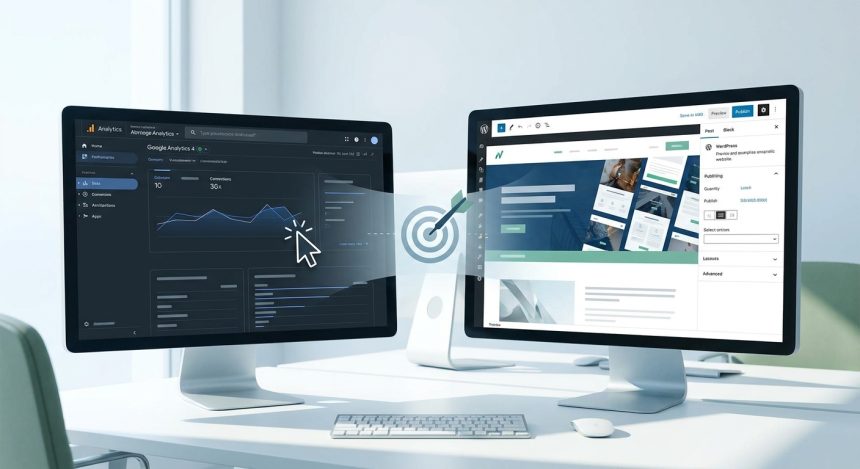
Stop guessing and start growing. Learn to use Google Analytics 4 with WordPress to create a website that converts and makes data-driven decisions.
SHARE

Tired of making blind decisions about your site? It's time to stop guessing. With Google Analytics 4 (GA4) and your WordPress, every interaction of your visitors becomes turns into valuable data. This tool allows you to understand what works and what doesn't, essential 7. for create a website that truly converts. Discover how to boost your digital strategy.

Contents
Entendiendo Google Analytics 4 y su Poder para tu WordPressCómo GA4 Transforma tu Estrategia al Crear una Página WebPasos Clave para Implementar GA4 en tu WordPressFrequently Asked Questions

Understanding Google Analytics 4 and its Power for your WordPress

Google Analytics 4 represents an evolution in digital measurement. It focuses on events and users, offering a more holistic view of the customer journey. Unlike its predecessor, Universal Analytics, GA4 is designed for a world multichannel and cookie-less. Integrating it into your WordPress is a key step for the future.

This new perspective helps you understand behavior patterns. You'll be able to see how users navigate, what content interests them, and where they leave your site. This information is pure gold for any improvement strategy.

How GA4 Transforms your Strategy by Create a Website

The implementation of GA4 on your WordPress is not just a technical matter. It is a strategic decision that directly impacts your ability to innovate. It allows you to:

  • Identify the most engaging content.
  • Optimize conversion funnels.
  • Personalize the user experience.
  • Make decisions based on real data.

With these insights, you can adjust your designs, improve copywriting, and focus your marketing efforts. To start, make sure to correctly configure your GA4 account and connect it to your site WordPress.

Steps Key to Implementing GA4 on your WordPress

Connecting Google Analytics 4 to your WordPress is simpler than it seems. There are plugins specific ones that facilitate this process. Once connected, the real work begins: interpreting the data.

You Might Also Like

Notion vs. Airtable: Optimizing Productivity Tools for Web Agencies
Goodbye to Slowness! 🚀 Your WordPress Will Fly: Increase PHP Memory Limit in 3 Steps (Guide for Novices and Experts!)
Goodbye to waiting! ⏳ Set up your WordPress in 120 seconds (yes, you read that right) and launch your project.
¡Stop Hackers! Tu WordPress blindado en minutos: Instala y configura Wordfence como un pro (¡y olvídate de los sustos!)

Analyze event reports, explorations, and funnels. Look for trends and anomalies. Use this information to test new ideas on your site. Remember that optimization is a continuous process. You can learn more about how to improve your website's performance on our blog.

Frequently Asked Questions

What is the main difference between GA4 and Universal Analytics?

GA4 is based on events and users, while Universal Analytics focused on sessions and page views. GA4 offers a more complete view of user behavior across different platforms.

Do I need advanced technical knowledge to use GA4 in WordPress?

Not necessarily. There are plugins of WordPress that simplify the installation and configuration of GA4, making data collection accessible even for users without deep technical experience.

How does GA4 help me improve my SEO?

By understanding which content and user paths are most popular, you can optimize your site for relevant keywords, improve user experience, and reduce bounce rate, key factors for good SEO.


TAGGED:adivinarCreateCreate webpageDejaGooglepage
Share This Article
Email Copy Link Print
Previous Article Woocommerce - Pasarelas de Pago para tu WooCommerce: ¿PayPal, Stripe o Redsys? ¡Elige la que hará explotar tus ventas sin dra Payment Gateways for your WooCommerce: PayPal, Stripe or Redsys? Choose the one that will make your sales explode without drama (and zero ghost commissions)!
Next Article AI and WordPress Translation: A Quantum Leap for Agencies and Developers
como instalar wordpress - Cómo instalar WordPress: ¿CPanel, FTP o Instalación Rápida? Descubre el método perfecto para tu pro
Cómo instalar WordPress: ¿CPanel, FTP o Instalación Rápida? Descubre el método perfecto para tu proyecto (¡Tú eliges el camino para tu web!)
WordPress
wordpress instalacion - ¡Crea tu web YA! 💸 WordPress Instalación Gratis: Guía para montar tu sitio sin gastar un euro (¡y si
¡Crea tu web YA! 💸 WordPress Instalación Gratis: Guía para montar tu sitio sin gastar un euro (¡y sin ser un experto!)
WordPress
como instalar wordpress - De cero a héroe web: Descubre cómo instalar WordPress y empezar a crear tu página web hoy mismo (¡T
De cero a héroe web: Descubre cómo instalar WordPress y empezar a crear tu página web hoy mismo (¡Tu negocio te lo agradecerá!).
WordPress
Ilustración de fragmentos de código organizados en una carpeta, representando un gestor de snippets
WPCode: el gestor de snippets de WordPress que se ha vuelto imprescindible
WordPress Plugins
Advertisement

You May Also Like

Wordpress - Tu blog se hace viral: la IA te revela cómo 'robar' la atención con títulos que triunfan en WordPress y Twitter.
AI & Web AutomationWordPress

Your blog goes viral: AI reveals how to 'steal' attention with winning titles on WordPress and Twitter.

July 15, 2026
WordPress

AI and WordPress Translation: A Quantum Leap for Agencies and Developers

July 15, 2026
Wordpress - ⚠️ ¡Error de Principiante! Los 5 Fallos al Instalar WordPress que Destrozan tu Web (y cómo evitarlos)
WordPress

⚠️ Beginner's Mistake! The 5 WordPress Installation Failures That Destroy Your Website (and how to avoid them)

July 17, 2026
Wordpress - ¡Alerta Roja en tu WordPress! 🚨 Descubre cómo Wordfence te convierte en un ninja de la seguridad web (Guía compl
Cybersecurity and Web SecurityWordPress Plugins

Red Alert on your WordPress! 🚨 Discover how Wordfence turns you into a web security ninja (Complete Guide: Installation, Configuration, and Active Defense)

July 15, 2026
Show More
  • More News:
  • WordPress
  • Discover
  • Create
  • instalación
  • Install
  • wordpress instalacion
  • Google
  • page
  • Create webpage
  • Plugins
  • WooCommerce
  • Yoast
  • instalando wordpress
  • future
  • instalando
  • create
  • I pay
  • Hosting
  • Guía
  • Install WordPress
BiblioWeb

Biblioweb.es

Web Technology News

Information you can trust: Stay up-to-date instantly with the latest news and live updates. From politics and technology to entertainment and much more.

YouTube Medium RSS

Links of interest

Subscribe now to receive real-time updates on the latest news!

Legal

  • Legal Notice
  • Terms and Conditions
  • Cookies Policy
  • Privacy Policy

Latest news

como instalar wordpress - Cómo instalar WordPress: ¿CPanel, FTP o Instalación Rápida? Descubre el método perfecto para tu pro

Cómo instalar WordPress: ¿CPanel, FTP o Instalación Rápida? Descubre el método perfecto para tu proyecto (¡Tú eliges el camino para tu web!)

29/07/2026
Continue reading
wordpress instalacion - ¡Crea tu web YA! 💸 WordPress Instalación Gratis: Guía para montar tu sitio sin gastar un euro (¡y si

¡Crea tu web YA! 💸 WordPress Instalación Gratis: Guía para montar tu sitio sin gastar un euro (¡y sin ser un experto!)

27/07/2026
Continue reading

© biblioweb.es 2026. All Rights Reserved.

Welcome to Foxiz
Username or Email Address
Password

Lost your password?

We use our own and third-party cookies for technical, analytics and, where applicable, marketing purposes. You can accept all cookies, reject them, or configure your preferences. More information

Necessary

Essential for the website to function. Always active.

Preferences

Allow remembering choices such as language or region.

Analytics

Help us understand how the website is used in order to improve it.

Marketing

Used to display relevant advertising and measure its effectiveness.