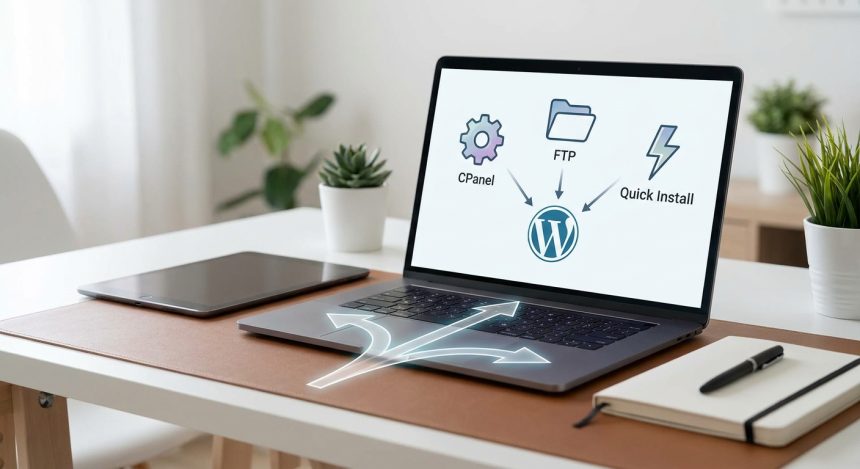
Do you dream of to have your own website or blog, but the idea of the installation overwhelms you? Worry no more. In this guide complete, we will show you how install WordPress in various ways, adapting to your knowledge and preferences. Forget about the headaches and get ready to bring your project digital. We will explore the most popular methods: from the convenience of CPanel to the precision of FTP, including the immediacy of quick installation. Your path to a successful website starts here!
Related terms:
- hosting WordPress
- web domain
- web server
- MySQL database
- automatic installer
- File manager
- migrate WordPress
- configure WordPress
Essential Preparation: The Ground for your WordPress
Imagine a blank canvas waiting to be painted, or fertile ground Ready for planting. Before diving into the installation of WordPress, it is crucial to have a solid foundation. This means choose a good hosting service and register a domain that represents your brand or project. Quality hosting ensures that your site web is fast and accessible for all your visitors. Think of it as the home where Your website will live, and the domain as its unique address on the internet.
Your hosting choice directly impacts your website's performance. Consider factors such as the speed, technical support, and scalability. Many providers offer installers of WordPress with a single click, greatly simplifying the initial process. Make sure the chosen hosting meets the minimum requirements of WordPress to avoid future problems. A good choice at this stage will save you a lot of headaches. You can review our guide on How to choose the best hosting for WordPress to make an informed decision.
- Choose a reliable and fast hosting provider
- Register a domain name that is memorable and relevant.
- Check the server requirements of WordPress (PHP, MySQL)
WordPress Installation with CPanel: Simplicity at Your Fingertips
Visualize an intuitive control panel, full of icons and clear options, where every action is performed with a simple click. Such is the experience of install WordPress through CPanel, the most popular control panel in the mayorof hosting services. This method is ideal for beginners and for those looking efficiency. CPanel integrates tools like Softaculous or Fantastico, which automate most of the process. With just a few details, your WordPress to beá Ready in minutes.
For start, access your CPanel with the credentials provided by your hosting. Look for the "Software" or "Websites" section and locate the icon for "WordPressor “Softaculous Apps Installer”. Click on it and follow the instructions. You will be asked to choose the domain where you want install WordPress, a username and password for the administrator, and a title for your siteConfirm the data and the installer will do the rest. This is, undoubtedly, the most recommended method if you seek speed and not you have previous experience with servers
Once the installation is complete, you will receive a mail electronic with the access details to your administration panel of WordPressFrom there you can start to customize your site, install themes and plugins. The ease of this method it convert in the preferred option for most users, allowing you to concentrate on your website's content and design from the primer moment
3. Manual Installation of WordPress via FTP: Total Control in Your Hands
Imagine a desk full of digital files, meticulously organized, and you, like an artisan, moving each piece to its exact place. The installation of WordPress via FTP (File Transfer Protocol) grants you granular control over each step of the process. Although it requires a bit more technical skill, it is invaluable for those who prefer to deeply understand how their system works or for situations where automatic installers are not available. This method involves downloading WordPress, upload it to the server and configure a database manually.
The first step is to download the latest version of WordPress from its official website. Then, using an FTP client like FileZilla, connect to your hosting server. Locate your domain's `public_html` or `www` folder and upload all the files from WordPress decompressed. In parallel, you must create a MySQL database and a user in your CPanel (section “Databases”). Note down the database name, user, and password. After uploading the files, rename `wp-config-sample.php` to `wp-config.php` and edit it with your database details. Finally, access your domain from the browser to complete the guided installation of WordPress.
This manual process is an excellent way to familiarize yourself with the file structure of WordPress and database management. It offers flexibility that automatic installers don't always they allow, being useful for advanced diagnostics or specific configurations. If you are comfortable with the terminal and file manipulation, this method will provide you with a deeper understanding of your web environment.
4. Quick WordPress Installation: Launch Your Website in a Matter of Minutes
Think of a rocket taking off, reaching its destination in the blink of an eye. WordPress's "quick install" refers to the highly automated processes offered by many hosting providers, often integrated directly into their client panels or as part of a "website builder." This approach minimizes the steps manuals, allowing even the most novice users to get their website up and running in a matter of seconds or a few minutes. It's the perfect option for those who value immediacy above all else.
This method is an optimized variation of the CPanel installer, but it often comes with an even more simplified interface or as part of a welcome package when you sign up for hosting. Some hosting providers, like SiteGround or Bluehost, have their own setup wizards that guide you from domain selection to WordPress installation and choosing an initial theme. You just need to follow the on-screen prompts, enter your site's basic information, and voilà!, your WordPress will be ready to use. It's a marvel of modern automation.
The main advantage of quick installation is its simplicity and speed. You don't need to worry about databases, FTP files, or technical configurations. It's a "plug-and-play" system that allows you to jump directly to the design and content creation phase. If your goal is to have a functional website as soon as possible and you're not interested in the underlying technical details, this is your best choice. For more tips on how to optimize your website after the installation, visit our article about Essential first steps after installing WordPress.
5. First Steps Post-Installation: Setting Up Your New Digital Home
Once your website's scaffolding is up, it's time to give it life and personality. Installing WordPress is just the beginning; the first post-installation steps are crucial to ensure your site is secure, functional, and optimized for search engines. Think of it as decorating and furnishing your new digital home. From basic setup to the installation of plugins Essentials, every detail counts for an optimal user experience and good SEO positioning.
Access your WordPress admin dashboard (`yourdomain.com/wp-admin`). First, go to "Settings" > "General" to configure the site title, tagline, and timezone. Next, in "Settings" > "Permalinks", choose an SEO-friendly URL structure, such as "Post name". Install an attractive theme that aligns with your brand and the plugins essentials: a plugin SEO as Yoast SEO, a plugin for security, and a cache one to improve speed. Don't forget create your first pages and entries!
Setting up your WordPress correctly from the beginning will save you time and effort in the long run. It's time to lay the groundwork for a robust and efficient website. Explore the administration panel, familiarize yourself with the options, and start building the content that will captivate your audience. Your digital project is already a reality!
Conclusion: Choose your path and launch your website!
We have traveled together the different paths to install WordPress, from the convenience of CPanel and the speed of quick installation to manual FTP control. Each method has its advantages and is perfect for a different type of user. The important thing is that now you have the knowledge to choose the option that best suits your needs and experience level. Don't let the technical aspects hold you back. It's time to take the next step and make your presence online! Eh Biblioweb, we are here to accompany you at every stage of your digital adventure.
Frequently Asked Questions about WordPress Installation
How long does it take to install WordPress?
Time varies by method. With an automatic installer (CPanel or quick install), WordPress can Be ready in 5 to 10 minutes. Manual installation via FTP can It will take between 20 and 30 minutes, depending on your connection speed and familiarity with the process.
Do I need programming knowledge to install WordPress?
No, not at all. The most common installation methods, such as those using CPanel or automatic installers, do not require any programming knowledge. They are guided and very intuitive processes. Manual installation via FTP also does not require programming, only knowing how to manipulate files and databases.
What is better, CPanel or FTP to install WordPress?
For most users, especially beginners, installation via CPanel (with Softaculous or similar) is the best option due to its ease and speed. The FTP method is preferable if you're looking for more comprehensive control over the process, have an unstable internet connection, or if the hosting's automatic installer fails. Both are valid, but CPanel is more accessible.
Frequently Asked Questions
What is it like installing WordPress?
Learn how to install WordPress step by step with our ultimate guide. Choose between CPanel, FTP or quick installation and launch your website today. Discover l
Why is it important how to install WordPress?
It helps you get better results and make informed decisions about How to install WordPress: CPanel, FTP, or Quick Install? Discover the perfect method for your project (You choose the path for your website!).
How to get started with installing WordPress?
Follow the steps described in this article and apply the recommendations according to your case.